Chapter 4: Using functions
fn eval and fn render to
execute the functions. In this chapter, we will take a closer look at how to execute the functions using these two
two approaches.Declarative function execution #
In many real-world scenarios, it is not enough only to have packages of static, fully-rendered resource configurations. You need the package to declare static data, as well as operations that should be performed on the current resources and any resource that may be added in the future, as you edit the package. Example use cases are as follows:
- Set the namespace on all the namespace-scoped resources.
- Always perform schema validation on the resources in the package.
- Always enforce a constraint policy on the resources in the package.
- Generate the resources using a human-authored custom resource.
In kpt, this is achieved by declaring a pipeline of functions in the Kptfile and executing all the pipelines in the package hierarchy in a depth-first order, using the fn render command.
In our wordpress example, the top-level wordpress package declares the following pipeline:
# wordpress/Kptfile (Excerpt)
apiVersion: kpt.dev/v1
kind: Kptfile
metadata:
  name: wordpress
pipeline:
  mutators:
    - image: ghcr.io/kptdev/krm-functions-catalog/set-labels:latest
      configMap:
        app: wordpress
  validators:
    - image: ghcr.io/kptdev/krm-functions-catalog/kubeconform:latest
This pipeline declares the following two functions:
set-label: this is a mutator function which adds a set of labels to the resources.kubeconform: this is a validator function which validates the resources against their OpenAPI schemas.
See the Functions Catalog for details about how to use a particular function.
There are two differences between the mutator functions and the validator functions:
- The validators are not allowed to modify the resources.
- The validators are always executed after the mutators.
The mysql subpackage declares a mutator function only, as follows:
# wordpress/mysql/Kptfile
apiVersion: kpt.dev/v1
kind: Kptfile
metadata:
  name: mysql
pipeline:
  mutators:
    - image: ghcr.io/kptdev/krm-functions-catalog/set-labels:latest
      configMap:
        tier: mysql
Let us now render the package hierarchy:
kpt fn render wordpress
Package "wordpress/mysql":

[PASS] "ghcr.io/kptdev/krm-functions-catalog/set-labels:latest"

Package "wordpress":

[PASS] "ghcr.io/kptdev/krm-functions-catalog/set-labels:latest"
[PASS] "ghcr.io/kptdev/krm-functions-catalog/kubeconform:latest"

Successfully executed 3 function(s) in 2 package(s).
See the render command reference for usage.
When you invoke the render command, kpt performs the following steps:
It executes sequentially the list of mutators declared in the
mysqlpackage. The input to the first function is the set of resources read from the configuration files in themysqlpackage. The output of the first function is the input of the second function, and so on.Similarly, it executes all the validators declared in the
mysqlpackage. The input to the first validator is the output of the last mutator. The output of the last validator is the output of the pipeline in themysqlpackage.It executes sequentially the list of mutators declared in the
wordpresspackage. The input to the first function is the union of the following:- The resources read from the configuration files in the
wordpresspackage. - The output of the pipeline from the
mysqlpackage (see step 2).
- The resources read from the configuration files in the
Similarly, it executes all the validators declared in the
wordpresspackage. The output of the last validator is the output of the pipeline in thewordpresspackage.It writes the output of step 4 by modifying the local filesystem in-place. This can change both the
wordpressand themysqlpackages.
The result is the following:
- The resources in the
mysqlpackage are labeled withtier: mysql. - The resources in the
mysqlandwordpresspackages are labeled withapp: wordpress. - The resources in the
mysqlandwordpresspackages are validated against their Open API specifications.
Render status tracking #
After each kpt fn render execution, kpt records the render status in the root package’s Kptfile. This provides visibility
into whether the most recent render succeeded or failed. This is helpful for debugging and tracking the state of the package.
The render status is recorded as a Rendered condition in the status.conditions section of the root Kptfile:
On success:
apiVersion: kpt.dev/v1
kind: Kptfile
metadata:
  name: wordpress
pipeline:
  mutators:
    - image: ghcr.io/kptdev/krm-functions-catalog/set-labels:latest
      configMap:
        app: wordpress
  validators:
    - image: ghcr.io/kptdev/krm-functions-catalog/kubeconform:latest
status:
  conditions:
    - type: Rendered
      status: "True"
      reason: RenderSuccess
On failure:
status:
  conditions:
    - type: Rendered
      status: "False"
      reason: RenderFailed
      message: |-
        pkg.render: pkg .:
        	pipeline.run: must run with `--allow-exec` option to allow running function binaries
The render status is only recorded when performing in-place rendering (this is the default mode). It is not recorded when using out-of-place modes, such as --output stdout, --output unwrap, or --output <directory>.
You can inspect the render status by examining the root Kptfile, in order to understand the result of the most recent render operation.
Debugging render failures #
When a render pipeline fails, you can configure the package to save partially rendered resources to the disk. This is particularly useful for debugging function pipeline issues by inspecting the changes that were made before the failure occurred.
By default, partially rendered resources are not saved when a render fails. To enable this behavior, add the kpt.dev/save-on-render-failure annotation to the Kptfile’s metadata section, as follows:
apiVersion: kpt.dev/v1
kind: Kptfile
metadata:
  name: wordpress
  annotations:
    kpt.dev/save-on-render-failure: "true"
pipeline:
  mutators:
    - image: ghcr.io/kptdev/krm-functions-catalog/set-labels:latest
      configMap:
        app: wordpress
  validators:
    - image: ghcr.io/kptdev/krm-functions-catalog/kubeconform:latest
With the kpt.dev/save-on-render-failure annotation set to true, if a function in the pipeline fails, kpt saves all the resources that had been successfully processed up to the point of failure. This allows you to examine the intermediate state and understand what transformations had been applied before the error occurred.
This annotation follows the same pattern as that of the kpt.dev/bfs-rendering annotation. It must be declared in the root package’s Kptfile before running kpt fn render.
Specifying function
#
For specifying the function field, the following fields are required:
imagetagexec
Details of these fields are set out below.
image
#
The image field specifies the container image for the function. You can specify an image from any container registry. If the registry is omitted, the default container registry for the functions catalog (ghcr.io/kptdev/krm-functions-catalog) is prepended automatically. For example, set-labels:latest is automatically expanded to ghcr.io/kptdev/krm-functions-catalog/set-labels:latest.
tag
#
The tag field specifies the exact tag of the function container image or a semantic version constraint for the
desired tag. The version constraints are validated by github.com/Masterminds/semver/v3. Therefore, they must fulfill that specification.
If a tag field is provided, it overrides whichever tag is already specified within the image field, even if the tag field is not a valid semantic version or constraint.
Examples:
image: set-labels
tag: "~0.2"
---
result: ghcr.io/kptdev/krm-functions-catalog/set-labels:v0.2.3 # latest patch version of 0.2.x
image: set-labels
tag: "<0.2"
---
result: ghcr.io/kptdev/krm-functions-catalog/set-labels:v0.1.5 # latest patch version of 0.1.x
image: set-labels:v0.2.1
tag: v0.2.3
---
result: ghcr.io/kptdev/krm-functions-catalog/set-labels:v0.2.3
image: set-labels@sha256:23631a784be4828a37ae98478df9d586840220ef87037c7703f6c61dcf8e49ac
tag: v0.2.3
---
result: ghcr.io/kptdev/krm-functions-catalog/set-labels:v0.2.3
image: set-labels:v0.2.1
tag: de3c135
---
result: ghcr.io/kptdev/krm-functions-catalog/set-labels:de3c135
exec
#
The exec field specifies the executable command for the function. You can specify an executable with arguments.
The following example uses the sed executable to replace all the occurrences of foo with bar in the package resources.
# PKG_DIR/Kptfile (Excerpt)
apiVersion: kpt.dev/v1
kind: Kptfile
metadata:
  name: app
pipeline:
  mutators:
    - exec: "sed -e 's/foo/bar/'"
Note:
You must render the package by allowing the executables. To do this, specify the --allow-exec command line flag, as shown below:
kpt fn render [PKG_DIR] --allow-exec
Using the exec field is not recommended, for the following two reasons:
- It makes the package non-portable, since rendering the package requires the executables to be present in the system.
- Executing binaries is not secure, since they can perform privileged operations in the system.
Specifying functionConfig
#
In Chapter 2, we saw the following conceptual representation of a function invocation:
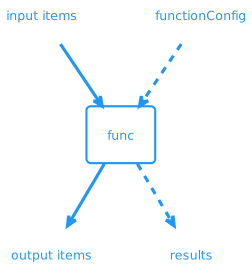
The functionConfig field is an optional meta resource containing the arguments to a particular invocation of the function. There are two different ways to declare the
functionConfig:
configPathconfigMap
configPath
#
The general way to provide a functionConfig of the arbitrary kind (core or custom resources) is to declare the resource in a separate file, in the same directory as the Kptfile, and refer to it using the configPath field.
For example:
# wordpress/mysql/Kptfile
apiVersion: kpt.dev/v1
kind: Kptfile
metadata:
  name: mysql
pipeline:
  mutators:
    - image: set-labels:latest
      configPath: labels.yaml
# wordpress/mysql/labels.yaml
apiVersion: v1
kind: ConfigMap
metadata:
  name: labels
data:
  tier: mysql
configMap
#
Many functions take a functionConfig of kind ConfigMap, since they only need simple key/value pairs as an argument. For convenience, there is a way to inline the key/value pairs in the Kptfile.
The following is equivalent to that which we showed in the previous example:
# wordpress/mysql/Kptfile
apiVersion: kpt.dev/v1
kind: Kptfile
metadata:
  name: mysql
pipeline:
  mutators:
    - image: set-labels:latest
      configMap:
        tier: mysql
Specifying function name
#
The functions can optionally be named using the pipeline.mutators.name field or the pipeline.validators.name field to identify a function.
For example:
# wordpress/mysql/Kptfile
apiVersion: kpt.dev/v1
kind: Kptfile
metadata:
  name: mysql
pipeline:
  mutators:
    - name: set tier label
      image: set-labels:latest
      configMap:
        tier: mysql
It is recommended to use unique function names for all the functions in the Kptfile function pipeline. If the name is specified, then the kpt pkg update will merge each function pipeline list as an associative list, using name as the merge key. An unspecified name, or duplicated names, may result in unexpected merges.
Specifying selectors
#
In some cases, it is necessary to invoke the function only on a subset of resources based on certain selection criteria. This can be accomplished using selectors. At a high level, the selectors work as follows:
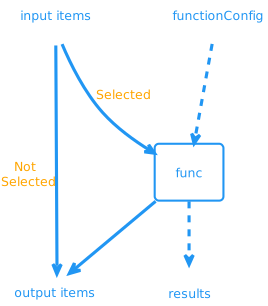
The resources that are selected are passed as input to the function. The resources that are not selected are passed through unchanged.
As an example, let us add a function to the pipeline that adds an annotation to the resources with the name wordpress-mysql only, as follows:
# wordpress/Kptfile (Excerpt)
apiVersion: kpt.dev/v1
kind: Kptfile
metadata:
  name: wordpress
pipeline:
  mutators:
    - image: ghcr.io/kptdev/krm-functions-catalog/set-annotations:latest
      configMap:
        tier: mysql
      selectors:
        - name: wordpress-mysql
    - image: ghcr.io/kptdev/krm-functions-catalog/set-labels:latest
      configMap:
         app: wordpress
  validators:
    - image: ghcr.io/kptdev/krm-functions-catalog/kubeconform:latest
When you invoke the render command, the mysql package is rendered first, and the set-annotations function is invoked only on the resources with the name wordpress-mysql. The set-label function is then invoked on all the resources in the package hierarchy of the wordpress package.
$ kpt fn render wordpress
Package "wordpress/mysql":
[RUNNING] "ghcr.io/kptdev/krm-functions-catalog/set-labels:latest"
[PASS] "ghcr.io/kptdev/krm-functions-catalog/set-labels:latest"

Package "wordpress":
[RUNNING] "ghcr.io/kptdev/krm-functions-catalog/set-annotations:latest" on 3 resource(s)
[PASS] "ghcr.io/kptdev/krm-functions-catalog/set-annotations:latest"
[RUNNING] "ghcr.io/kptdev/krm-functions-catalog/set-labels:latest"
[PASS] "ghcr.io/kptdev/krm-functions-catalog/set-labels:latest"
[RUNNING] "ghcr.io/kptdev/krm-functions-catalog/kubeconform:latest"
[PASS] "ghcr.io/kptdev/krm-functions-catalog/kubeconform:latest"

Successfully executed 4 function(s) in 2 package(s).
As another example, let us add another function to the pipeline that adds a prefix to the name of a resource if either of the following is true:
- It has the kind
Deploymentand the namewordpress. - It has the kind
Serviceand the namewordpress.
# wordpress/Kptfile (Excerpt)
apiVersion: kpt.dev/v1
kind: Kptfile
metadata:
  name: wordpress
pipeline:
  mutators:
    - image: ghcr.io/kptdev/krm-functions-catalog/set-annotations:latest
      configMap:
        tier: mysql
      selectors:
        - name: wordpress-mysql
    - image: ghcr.io/kptdev/krm-functions-catalog/set-labels:latest
      configMap:
        app: wordpress
    - image: ghcr.io/kptdev/krm-functions-catalog/ensure-name-substring:latest
      configMap:
        prepend: dev-
      selectors:
        - kind: Deployment
          name: wordpress
        - kind: Service
          name: wordpress
  validators:
    - image: ghcr.io/kptdev/krm-functions-catalog/kubeconform:latest
Render the package as follows:
kpt fn render wordpress
Package "wordpress/mysql":
[RUNNING] "ghcr.io/kptdev/krm-functions-catalog/set-labels:latest"
[PASS] "ghcr.io/kptdev/krm-functions-catalog/set-labels:latest"

Package "wordpress":
[RUNNING] "ghcr.io/kptdev/krm-functions-catalog/set-annotations:latest" on 3 resource(s)
[PASS] "ghcr.io/kptdev/krm-functions-catalog/set-annotations:latest"
[RUNNING] "ghcr.io/kptdev/krm-functions-catalog/set-labels:latest"
[PASS] "ghcr.io/kptdev/krm-functions-catalog/set-labels:latest"
[RUNNING] "ghcr.io/kptdev/krm-functions-catalog/ensure-name-substring:latest" on 2 resource(s)
[PASS] "ghcr.io/kptdev/krm-functions-catalog/ensure-name-substring:latest"
[RUNNING] "ghcr.io/kptdev/krm-functions-catalog/kubeconform:latest"
[PASS] "ghcr.io/kptdev/krm-functions-catalog/kubeconform:latest"

Successfully executed 5 function(s) in 2 package(s).
Note:
The ensure-name-substring function is applied only to the
resources matching the selection criteria.
If you have resources with particular labels or annotations that you want to use to select your resources, then you can use them. Here, for example, is a function that is only applied to the resources matching the label foo: bar:
apiVersion: kpt.dev/v1
kind: Kptfile
metadata:
  name: wordpress
pipeline:
  mutators:
    - image: ghcr.io/kptdev/krm-functions-catalog/set-annotations:latest
      configMap:
        tier: mysql
      selectors:
        - labels:
            foo: bar
  validators:
    - image: ghcr.io/kptdev/krm-functions-catalog/kubeconform:latest
The following are the matchers that you can specify in a selector:
apiVersion: this is theapiVersionfield value of the resources to be selected.kind: this is thekindfield value of the resources to be selected.name: this is themetadata.namefield value of the resources to be selected.namespace: this is themetadata.namespacefield of the resources to be selected.annotations: the resources with matching annotations will be selected.labels: the resources with matching labels will be selected.
Specifying exclude
#
Similarly to the selectors, you can also specify the resources that should be excluded from the functions.
For example, you can exclude a resource if it has both the kind Deployment and the name nginx, as follows:
apiVersion: kpt.dev/v1
kind: Kptfile
metadata:
  name: wordpress
pipeline:
  mutators:
    - image: ghcr.io/kptdev/krm-functions-catalog/set-annotations:latest
      configMap:
        tier: mysql
      exclude:
        - kind: Deployment
          name: nginx
  validators:
    - image: ghcr.io/kptdev/krm-functions-catalog/kubeconform:latest
This is distinct from the following example, which excludes a resource if it has either the kind Deployment or the name nginx, as follows:
apiVersion: kpt.dev/v1
kind: Kptfile
metadata:
  name: wordpress
pipeline:
  mutators:
    - image: ghcr.io/kptdev/krm-functions-catalog/set-annotations:latest
      configMap:
        tier: mysql
      exclude:
        - kind: Deployment
        - name: nginx
  validators:
    - image: ghcr.io/kptdev/krm-functions-catalog/kubeconform:latest
The following are the matchers you can specify in an exclusion:
apiVersion: this is theapiVersionfield value of the resources to be excluded.kind: this is thekindfield value of the resources to be excluded.name: this is themetadata.namefield value of the resources to be excluded.namespace: this is themetadata.namespacefield of the resources to be excluded.annotations: the resources with matching annotations will be excluded.labels: the resources with matching labels will be excluded.
Imperative function execution #
The fn eval command enables you to execute a single function without declaring it in the package. This is referred to as an imperative function execution.
For example, to set the namespace of all resources in the wordpress package hierarchy, use the following command:
kpt fn eval wordpress --image ghcr.io/kptdev/krm-functions-catalog/set-namespace:latest -- namespace=mywordpress
Alternatively, for convenience, you can use the short-hand form of the above command:
kpt fn eval wordpress -i set-namespace:latest -- namespace=mywordpress
See the eval command reference for usage.
This changes the resources in the wordpress package and the mysql subpackage.
For comparison, this has the same effect as the following declaration:
# wordpress/Kptfile (Excerpt)
apiVersion: kpt.dev/v1
kind: Kptfile
metadata:
  name: wordpress
pipeline:
  mutators:
    - image: ghcr.io/kptdev/krm-functions-catalog/set-namespace:latest
      configMap:
        namespace: mywordpress
When should you execute a function using eval, instead of render?
When you have one of the following use cases:
- Performing a one-time operation.
- Executing a function from a CI/CD system on packages authored by other teams.
- Developing shell scripts and chain functions with the Unix pipe (
|). - Executing the function with privileges (not allowed by the
rendercommand).
These topics will be covered in detail later on.
Specifying functionConfig
#
There are two ways to specify the functionConfig:
fn-configflag- CLI arguments
fn-config flag
#
The general way to provide a functionConfig of the arbitrary kind (core or custom resources) is to declare the resource in a separate file and use the fn-config flag.
cat << EOF > /tmp/fn-config.yaml
apiVersion: v1
kind: ConfigMap
metadata:
  name: ns
data:
  namespace: mywordpress
EOF
kpt fn eval wordpress -i set-namespace:latest --fn-config /tmp/fn-config.yaml
CLI arguments #
Many functions take a functionConfig of the kind ConfigMap, since they only need simple key/value pairs as an argument. For convenience, there is a way to provide the key/value pairs as command line arguments. The following is equivalent to that which we showed in the previous example:
kpt fn eval wordpress -i set-namespace:latest -- namespace=mywordpress
Note:
The arguments must come after the separator --.
Specifying selectors
#
Selectors can be used to target specific resources for a function execution.
For example, you can selectively add an annotation to the resources if it has the kind Deployment and the name wordpress:
kpt fn eval wordpress -i set-annotations:latest --match-kind Deployment --match-name wordpress -- foo=bar
The available selector matcher flags are as follows:
match-api-versionmatch-kindmatch-namematch-namespacematch-annotationsmatch-labels
Specifying exclusions
#
Exclusions can be used to exclude specific resources for a function execution.
For example, you can set the namespaces of all the resources in the wordpress package, except for the ones that have the label foo: bar:
kpt fn eval wordpress -i set-namespace:latest --exclude-labels foo=bar -- namespace=my-namespace
If you use multiple exclusions, it will exclude the resources that match all the provided exclusions. For example, you can set the namespaces of all the resources, except for those that have both the kind Deployment and the name nginx, as follows:
kpt fn eval wordpress -i set-namespace:latest --exclude-kind Deployment --exclude-name nginx -- namespace=my-namespace
The list of available exclusion flags is as follows:
exclude-api-versionexclude-kindexclude-nameexclude-namespaceexclude-annotationsexclude-labels
Privileged Execution #
Since the function is provided explicitly by the user, the eval command can be more privileged and low-level than a declarative invocation using the render command. For example,
it can have access to the host system.
In general, we recommend against having functions that require privileged access to the host. Such functions can only be executed imperatively and may pose a challenge in terms of security, correctness, portability, and speed. If possible, the functions should be executed hermetically with all the required dependencies, either passed in as KRM resources (input items or functionConfig), or included in the container image. However, there are some legitimate use cases in which the only available
option requires either network access or mounting a volume from the host. In such situations, you can use the eval command, as described below.
Network access #
By default, the functions cannot access the network. You can enable network access by using the --network flag.
The kubeconform function can, for example, download a JSON schema file, as follows:
kpt fn eval wordpress -i kubeconform:latest --network -- schema_location="https://kubernetesjsonschema.dev"
Mounting directories #
By default, the functions cannot access the host file system. You can use the --mount flag to mount the host volumes. kpt accepts the same options to --mount, as specified on the
Docker Volumes page.
The kubeconform function can, for example, consume a JSON schema file, as follows:
kpt fn eval -i kubeconform:latest --mount type=bind,src="/path/to/schema-dir",dst=/schema-dir --as-current-user wordpress -- schema_location=file:///schema-dir
Note:
The --as-current-user flag may be required to run the function as your uid, instead of the default nobody, to access the host filesystem.
All the volumes are mounted as readonly by default. To mount volumes in read-write mode, specify rw=true, as follows:
--mount type=bind,src="/path/to/schema-dir",dst=/schema-dir,rw=true
Chaining functions using the Unix pipe #
As an alternative to declaring a pipeline in the Kptfile, you can chain functions using the Unix pipe.
Here is an example:
kpt fn source wordpress \
  | kpt fn eval - -i set-namespace:latest -- namespace=mywordpress \
  | kpt fn eval - -i set-labels:latest -- app=wordpress env=prod \
  | kpt fn sink my-wordpress
See the command reference for usage of the source command and the sink command.
The above pipeline can be described as follows:
- The
sourcecommand is used to read the resources in the package hierarchy (thewordpressandmysqlpackages). The output of thesourcecommand follows the KRM Function Specification standard, which we will look at in chapter 5. - The output of the
sourcefunction is piped into theset-namespacefunction. Theevalcommand is instructed to read the inputs items from thestdin, using-. This is the convention used in all commands in kpt that can read fromstdin. Theset-namespacefunction mutates the input items and emits the output items. - The output of the
set-namespacefunction is piped intoset-labelsfunction. This adds the given labels to all the resources. - The
sinkcommand writes the output of theset-labelsto the filesystem.
This is a low-level and less abstracted approach to executing functions. You can instead write the output of the pipeline to a different directory, instead of mutating the directory in-place. You can also pipe to other programs (such as sed and yq) that are not functions. Be mindful that the cost of this low-level flexibility is not having the benefits provided by the functions: scalability, reusability, and encapsulation.
Function results #
In kpt, the counterpart to the Unix philsophophy of “everything is a file” is “everything is a Kubernetes resource”. This also extends to the results of executing the functions using the eval or render command. In addition to providing a human-readable terminal output, these commands provide
structured results which can be consumed by other tools. This enables you to build robust UI layers on top of kpt. You can, for example, do the following:
- Create a custom dashboard that shows the results returned by the functions.
- Annotate a GitHub pull request with the results returned by a validator function at the granularity of the individuals fields.
In both the render and the eval commands, structured results can be enabled using the --results-dir flag.
For example:
kpt fn render wordpress --results-dir /tmp
Package "wordpress/mysql":

[PASS] "ghcr.io/kptdev/krm-functions-catalog/set-labels:latest"

Package "wordpress":

[PASS] "ghcr.io/kptdev/krm-functions-catalog/set-labels:latest"
[PASS] "ghcr.io/kptdev/krm-functions-catalog/kubeconform:latest"

Successfully executed 3 function(s) in 2 package(s).
For complete results, see /tmp/results.yaml
The results are provided as a resource of kind FunctionResultList:
# /tmp/results.yaml
apiVersion: kpt.dev/v1
kind: FunctionResultList
metadata:
  name: fnresults
exitCode: 0
items:
  - image: ghcr.io/kptdev/krm-functions-catalog/set-labels:latest
    exitCode: 0
  - image: ghcr.io/kptdev/krm-functions-catalog/set-labels:latest
    exitCode: 0
  - image: ghcr.io/kptdev/krm-functions-catalog/kubeconform:latest
    exitCode: 0
We can see a more interesting result, in which the kubeconform function catches a validation issue.
For example, change the value of the port field in the service.yaml from 80 to "80" and rerun the command:
kpt fn render wordpress --results-dir /tmp
Package "wordpress/mysql":

[PASS] "ghcr.io/kptdev/krm-functions-catalog/set-labels:latest"

Package "wordpress":

[PASS] "ghcr.io/kptdev/krm-functions-catalog/set-labels:latest"
[FAIL] "ghcr.io/kptdev/krm-functions-catalog/kubeconform:latest"
  Results:
    [ERROR] Invalid type. Expected: integer, given: string in object "v1/Service/wordpress" in file "service.yaml" in field "spec.ports.0.port"
  Exit code: 1

For complete results, see /tmp/results.yaml
The results resource will now contain the failure details:
# /tmp/results.yaml
apiVersion: kpt.dev/v1
kind: FunctionResultList
metadata:
  name: fnresults
exitCode: 1
items:
  - image: ghcr.io/kptdev/krm-functions-catalog/set-labels:latest
    exitCode: 0
  - image: ghcr.io/kptdev/krm-functions-catalog/set-labels:latest
    exitCode: 0
  - image: ghcr.io/kptdev/krm-functions-catalog/kubeconform:latest
    exitCode: 1
    results:
      - message: "Invalid type. Expected: integer, given: string"
        severity: error
        resourceRef:
          apiVersion: v1
          kind: Service
          name: wordpress
        field:
          path: spec.ports.0.port
        file:
          path: service.yaml